Rabu, 25 Agustus 2010

Create own Immune USB FlashDrive against Virus

Hi, all..
Today, I got some question :)

Q: How can a computer being infected by virus??
A: Of course from Internet, or from other computer..

Q: How? My computer got never connect Internet, but where is the virus from??
A: Maybe, its from other memory such as FlashDisk, ThumbDrive, Memory card, and other thing which got memory...

Q: What to do to avoid it?? FlaskDisk and others got no self anti virus inside, so how to prevent it??
A: Of course create own virus protection..

Q: But, I am not a programmer and got know nothing about it..
A: Me too:p.. But don't worry, just few steps, everything will be OK!!

Before start the steps, Here some knowledge I would like to share..
Most Virus, which infected to a USB driver, will create a file with name "autorun.inf"..
Other explanation will be after the steps..
if you feel so troublesome, you make just skip the tutorial and get move till download session..


Nah, here what's to do:
1. Create a folder with name "autorun.inf".
2. Inside the "autorun.inf" folder, create a blank text Document (Click on left\New\Text Document)
3. Run Character Map at "Start/All Programs/Accecories/System Tools/Character Map".
4. On font, select on any fonts with word "Unicode" such as "Arial Unicode MS" or "Lucide Sans Unicode".
5. Drag till found strange unicode like "Җ" and others else...
6. Select 4-5 strange unicodes as you like, then copy.
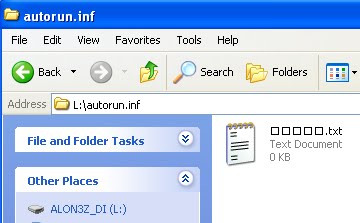
7. Rename the "Text Document.txt" inside "flashDisk/autorun.inf" folder..
8. If the text name will be shown in "Square", Don't worry, Its normal..
Here some Screenshot..=)
Download Session:
Got no sense with what the tutorial teach??
Just download this and extract the folder into your FlashDisk
Here download link,
http://www.ziddu.com/download/11369645/autorun.inf.zip.html

As its only a text file without any word inside, It spend 0 byte to your FlashDisk..
If it look so annoying, just make it hidden..

Continue on FAQ
Q: How does it work???
A: Most virus create an "autorun.inf" file on flaskDisk.. If in flashDisk had already got the file name, virus can't create any "autorun.inf" file anymore as flashDrive had already got such name :)
Q: Can't Virus delete the file which make it manually and then create a new "autorun.inf" file?
A: Of course it can, but most virus can't read any unicode character, that's why recommended on using unicode font.. Till the now, still got no virus can read unicode :p

At last, FlashDisk will remain clean and clear from virus..
Brilliant Idea right?? ;)

This Articel I got in from "http://edwinyang10.blogspot.com" thx sooooo muchhhhh...

Kamis, 19 Agustus 2010

VBoy S60

Emulator-ing time XD

After some games for s60v3, this time turn to s60, V-boy, GBC emulator...
I have been hunting for years only for s60v3 edition v-boy, but till now, still don't get it yet :(

Some web may share v-boy v1.31 for s60v3 and also the keygen, but, its don't work smoothly as after a few days, game will crash.. :(

Till today, only for s60 version..
Here's download link for VBoy S60:
http://www.ziddu.com/download/11285252/VBoyS60.zip.html

For the keygen, please run it on a PC, here the keygen:
http://www.ziddu.com/download/11285254/VKeyGen.zip.html

Also my childhood best game for myself, POKEMON CRYSTAL XD:
http://www.ziddu.com/download/11285253/Pokemon-CrystalVersionUEV1.1C.zip.html

How to install:
1. Download all 3 zip files.
2. Extract and install "VBoy.sis".
3. Run VBoy and click on "Active" and write down the IMEI code.
4. Extract "VKeygen.zip" on PC, then run it.
5. Enter IMEI code on the dialogue box and click generate then check Activation Code code for VBoy.
6. Write down the Activation Code on VBoy application and click on active.
7. Extract "Pokemon-CrystalVersionUEV1.1C.zip.html" and put it on "e:/data/others/vboy"

For other roms, visit doperoms.com/

Enjoy^^,

Selasa, 10 Agustus 2010

Crazy spot S60v3

Gaming time =)

I got a fun games for everyone, Crazy Spot!!!

A very simple game finding 5 diffirent between 2 picture, But quite interesting =)

Here download link =)
http://www.ziddu.com/download/11316507/UMobileGameCrazySpotv1.01S60v3.zip.html

For the keygen, run it on computer.
On owner box, enter IMEI (check IMEI on desktop *#06#),
here download link for Keygen:
http://www.ziddu.com/download/11316506/UMobileGameCrazySpotv1.01S60v3Keygen.zip.html

Enjoy^^,

Piano FX 4.0

Do Re Mi Fa Sol La Si DOOOO...

Ever think playing Classic canon on your KeyBoard??

Can't?? Of course you can with only this software...
Piano FX let everyone to have a Piano at home...

Don't believe it? Here some ScreenShot:


Just installed and enter the serial.. Here's the serial:

Name: rasgele
Key : Unreg-isteJ-E8NN0-P3087-TJ67C

Upzz..
before installed, of course download it first, here the link :D
http://www.ziddu.com/download/11152867/KeyboardPiano.zip.html

Enjoy^^,

Minggu, 08 Agustus 2010

Phyton

Hi, hi and hi!!!
Had been a time I didn't update my blog =D

This time, I will serve everyone right with good Application for software...
Phyton!!! (Maybe everyone will think about a snake) :p

Phyton has a good work for many application..
Some application didn't work without phyton, such as KPatcher(KMS crack), Automan, and other mores..
Here's to download it:
1. PythonForS60_1_4_5_3rdEd.rar
2. MegaPyModulePack.v2.01 Unsigned.zip
3. PythonScriptShell_3rdEd.zip
4. Python_forS60_3rded_and_5thed.zip

Maybe it got many installer, but just install those..
All 4 application must installed in a same destination (Either C: or E:), mustn't installed in diffirent destination otherwise "Phyton" won't work..

Important Note:
If one's want to install an application for example : "AutoMan", ones must install "Automan" to C: (Phone Memory) or E: (Memory card) according where "Phyton" were installed destination otherwise "Automan" won't work..
e.g : Installed all "Phyton" application and "Automan" in Phone Memory(C:).

Maybe it's a bit confusing, but get try..
B'lieve on will Success one day!!!

Rabu, 14 Juli 2010

VBag

Hi again all..

How nice if a phone mobile can work like a GameBoy Advance, which work like PC visualBoy Advance...

Stop dreaming because it's not a dream anymore^^,

It's possible to play a GBA games on mobile but sadly only work for s60 and s60v3 mobile :(

Nah, what had to do:

1. Download "VBagX" emulator at:

For s60:

http://www.ziddu.com/download/10717813/vbagxS60.zip.html

For s60v3:

 http://www.ziddu.com/download/10717612/VBagX1.25.zip.html

2. Download also the keygen (Contained Virus, so turn off AntiVirus to run the application. Virus isn't harmfull at all) at:

For s60:

http://www.ziddu.com/download/10717899/vBagXKeygens60.zip.html

For s60v3

http://www.ziddu.com/download/10717730/vBagXKeygen.zip.html

3. Enter phone IMEI (Check IMEI *#06#), and generate the activation code.

4. Run "VBag" Emulator, select "Option" then "Active", insert the activation code.

5. Download any ROMS(GBA Games with "*.gba" extension) at:

  ~  doperoms.com/

  ~  www.gameboy-advance-roms.com

6. Place the ROMS at e:/data/others/VBag/

then Enjoy^^,

Sabtu, 26 Juni 2010

PSP and NDS Roms

NDS rom disini:
http://nds-roms.com/
http://ds.rom-news.org/
http://romsite.net/
http://www.3roms.com/index.php
http://www.nintendo-ds-roms.com/
http://ndash.org/en/?lnk=dsn
http://www.ninpower.com/

PSP iso disini:
http://www.pspiso.com/ (register dulu, gratis. Gw jamin lu bakalan puas kesini)..
http://pspisos.org/
http://www.pspshare.org/
http://pspisoz.com (password winrar = www.pspisoz.com)