Senin, 26 September 2011
M-Commerce

Selasa, 20 September 2011
membandingkan jaringan 3G dan ASDL
Jaringan 3GSenin, 12 September 2011
membandingkan dua Web e-commerce

bila dilihat dengan baik, Pada Plasa dapat kita lihat Web tersebut memiliki tampilan yang menarik dan penuh dengan warna dan tentunya tertata dengan rapi pada kategori-kategori yang ada.
Dari yang dapat kita lihat pada Rakuten adalah tampilannya yang bersifat sederhana dan tertata rapi, and tampilannya di dominan oleh warna Merah dan Putih bowh!!! nasionalis cuy^^Rabu, 25 Agustus 2010
Deepfreeze
On public internet cafe's computer, everytime after using their PC, and after restart, everything will be automatically into hasn't using it condition..
Even one's mess their all their files, copy and install a lot of crap, or even install many kind of virus, but after restart, everything will be OK..
How could it be??
Of course it could be with using "DeepFreeze" from Faronic...
Its not a free software, but if you download at here, definitely full version b'coz its hacked version...
Here's I got some FAQ about it from Faronic
-START-
1. What is Deep Freeze and how does it work?
Deep Freeze is a software application that removes any changes made to a protected computer upon reboot.
The details about the internal working of Deep Freeze cannot be shared. Faronics has successfully applied
the concept to Windows, Mac OS, and Linux based operating systems.
2. How does Deep Freeze handle virus attacks?
Deep Freeze is not marketed as antivirus software. However, any virus that infects a Frozen computer is treated
the same as any other change. When you reboot your computer, Deep Freeze completely removes any changes made by viruses.
Any Trojans, worms, spyware, malware, and macro viruses are completely removed from your computer without affecting your
Operating System or saved data.
3. How do I exempt a folder or file from Deep Freeze so that my application can update and my users can save their data?
Deep Freeze does not differentiate between user data, application data, or a virus infecting the system. While this provides
a very robust method of protecting the integrity of the computer, specific files and folders cannot be exempted from the actions
of Deep Freeze. However, there are many methods to redirect applications and user data to a second volume, either physical or virtual,
that can be marked as exempted from the actions of Deep Freeze.
4. I installed Deep Freeze and forgot my password; can you give me a password to turn Deep Freeze off?
There are no backdoor passwords to Deep Freeze. Faronics cannot recover lost, forgotten, changed, or otherwise misplaced
passwords or Customization Codes.
For licensed versions of Deep Freeze:
Using our unique One Time Password system, Deep Freeze Enterprise Administrators can generate One Time Passwords (OTP). To generate an OTP:
1. Open the Deep Freeze login dialog on the workstation for which you need to generate the OTP.
2. Write down the Token code which is located at the top of the login dialog.
3. Open the Deep Freeze Configuration Administrator and click the One-Time Passwords tab or open the Enterprise Console and
click on Tools > One Time Password.
4. Enter the code you recorded into the Token field and click Generate OTP. Another code will appear in the OTP field.
The second code is the password for the workstation.
The newly generated One-Time Password can then be used to disable, uninstall, and re-install Deep Freeze with the correct password.
For Evaluation versions of Deep Freeze:
1. Restart the computer.
2. Enter the system BIOS settings.
3. Advance the clock by at least 60 days and then restart your computer. This will disable the software.
4. After the system has started, run the Deep Freeze installation program to uninstall Deep Freeze.
5. After the computer reboots, re-enter the BIOS and reset the clock to the current date. You can then re-install Deep Freeze after restarting.
If you are running a licensed copy of Deep Freeze Standard please contact Faronics Technical Support
at Toll Free: 800-943-6422 or Tel: +1 (604) 637-3333 with your license information so that a support case can be opened on your issue.
4. Deep Freeze is installed on my computer. I would like to uninstall it. How is this done?
Disable Deep Freeze before uninstalling it.
To disable Deep Freeze:
1. Hold down the shift key and double-click the Deep Freeze icon. Alternatively, you can press CTRL+ALT+SHIFT+F6.
2. Enter your password and click OK.
3. If you have not yet entered a password you should be able to click OK without entering a password.
4. The Boot Options dialog is displayed. Select "Boot Thawed" and click OK. This will disable Deep Freeze on the next reboot.
5. Reboot your computer. After the computer reboots, you are ready to uninstall Deep Freeze.
To uninstall:
1. Locate the installation file you used to install Deep Freeze on your computer. By default, the name of this file is called "DF5Std.exe"
for versions 5.X and "DF6Std.exe" for versions 6.X.
2. Run the installation file (DF5Std.exe or DF6Std.exe).
3. Select the option to "Uninstall"
Deep Freeze is uninstalled and your computer is rebooted.
5. How do I enable or disable Deep Freeze?
One or more methods can be employed to enable/disable (Freeze/Thaw) Deep Freeze depending on the version being used.
A) Locally at the workstation (Deep Freeze Standard and Enterprise):
The following steps can be used to disable (Thaw) Deep Freeze:
1. Hold down the SHIFT key and double-click the Deep Freeze icon. Alternatively, you can press CTRL+ALT+SHIFT+F6. A Password dialog is displayed.
2. Enter your password and click OK. If you have not yet entered a password you should be able to click OK without entering a password.
The Boot Options dialog is displayed.
3. Select "Boot Thawed" and click OK. This will disable Deep Freeze on the next reboot.
4. The same steps can be used to enable (Freeze) Deep Freeze. The only change is to select "Boot Frozen" instead of “Boot Thawed”.
B) Remotely via Deep Freeze Command Line Control (Deep Freeze Enterprise only):
Deep Freeze Command Line Control (DFC.EXE) can be used to Thaw/Freeze Deep Freeze through a script or batch file.
C) Remotely via the Enterprise Console (Deep Freeze Enterprise only):
The Deep Freeze Enterprise Console can be used to Thaw/Freeze a workstation using the following steps:
1. Select the workstations to Thaw/Freeze.
2. Click the "Reboot in Thawed state" button to Thaw the selected workstations. The workstations should reboot and appear in the Console in a Thawed state.
3. Click the "Reboot in Frozen state" button to Freeze the selected workstations. The workstations should reboot and appear in the Console in a Frozen state.
6. I'm having problems with my computer running Deep Freeze. I cannot see the icon on the system tray and the computer will not enter into a frozen state.
What can be done to resolve this problem?
This problem generally occurs on workstations running an nVidia nForce based motherboard chipset. nForce IDE drivers report the characteristics of
devices attached to the IDE controllers in a certain way that prevents Deep Freeze from functioning properly.
nForce IDE drivers with version numbers earlier than v6.66 "WHQL" will display this type of behavior. To resolve this issue,
it is recommended that the workstation be updated to the latest version of the nForce IDE drivers. If updated versions of the IDE drivers are
not available for your specific platform, remove the IDE drivers for Deep Freeze to function properly.
In some cases, workstations may be configured with an IDE or SATA raid controller. In such a scenario, updating the driver may require
that the operating system be re-loaded. Also, the updated driver should be used to allow Windows to see the RAID array during Windows installation.
Please note that if updated SATA / IDE RAID drivers are not available, the system will not be able to run Deep Freeze when the computer boots from
the SATA RAID controller. To resolve this issue, configure your computer with the hard disks connected to a non-RAID controller that can be seen by
Windows without the use of the SATA RAID Driver.
-END-
Although I don't really understand, but i still enjoy this software very much..
Help me on very much experiment..
Here a FAQ create by me :p
Q: What must I do if I forget my password???!!!
A: Format totaly your PC :p
or....
You may use DeepFreeze hack!!!
DeepFreeze hack help on thaw deepfreeze without using any password...
Here Download link for DeepFreeze Full:
http://www.ziddu.com/download/11373518/DeepFreezeFull6.20.20.1692.exe.html
Here Download link for DeepFreeze Hack:
http://www.ziddu.com/download/11373517/DeepFreezeHack.rar.html
Enjoy^^,
Create folder with no name
MemoryUp Proffesional
It's not impossible, all needed only "MemoryUp Proffesional" application which can get it at here:
http://www.ziddu.com/download/11372841/memoryuppr_129six4u.jar.html
How to install:
1. Run "memoryuppr_129six4u.jar" and install it.
2. Run the software.
3. Click on "Option" then "Register".
4. Register it with: 00000000000000000000(20 zeros,no need email).
Enjoy^^,
Mobile PDF
This time, I prepare good stuff for java mobile user..
Bringing "PDF" file to java mobile and read it..
Only with using MobilePDF, its possible to make phone to able running "*.pdf" file...
Here to get it:
http://www.ziddu.com/download/11372355/MobilePDF.jar.html
It may said its a trial version, but its already hack by Xavi, trial for 10 years ;)
Create own Immune USB FlashDrive against Virus
Today, I got some question :)
Q: How can a computer being infected by virus??
A: Of course from Internet, or from other computer..
Q: How? My computer got never connect Internet, but where is the virus from??
A: Maybe, its from other memory such as FlashDisk, ThumbDrive, Memory card, and other thing which got memory...
Q: What to do to avoid it?? FlaskDisk and others got no self anti virus inside, so how to prevent it??
A: Of course create own virus protection..
Q: But, I am not a programmer and got know nothing about it..
A: Me too:p.. But don't worry, just few steps, everything will be OK!!
Before start the steps, Here some knowledge I would like to share..
Most Virus, which infected to a USB driver, will create a file with name "autorun.inf"..
Other explanation will be after the steps..
if you feel so troublesome, you make just skip the tutorial and get move till download session..
Nah, here what's to do:
1. Create a folder with name "autorun.inf".
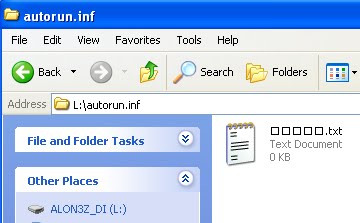
2. Inside the "autorun.inf" folder, create a blank text Document (Click on left\New\Text Document)
3. Run Character Map at "Start/All Programs/Accecories/System Tools/Character Map".
4. On font, select on any fonts with word "Unicode" such as "Arial Unicode MS" or "Lucide Sans Unicode".

5. Drag till found strange unicode like "Җ" and others else...
6. Select 4-5 strange unicodes as you like, then copy.
7. Rename the "Text Document.txt" inside "flashDisk/autorun.inf" folder..
8. If the text name will be shown in "Square", Don't worry, Its normal..
Here some Screenshot..=)

Download Session:
Got no sense with what the tutorial teach??
Just download this and extract the folder into your FlashDisk
Here download link,
http://www.ziddu.com/download/11369645/autorun.inf.zip.html
As its only a text file without any word inside, It spend 0 byte to your FlashDisk..
If it look so annoying, just make it hidden..
Continue on FAQ
Q: How does it work???
A: Most virus create an "autorun.inf" file on flaskDisk.. If in flashDisk had already got the file name, virus can't create any "autorun.inf" file anymore as flashDrive had already got such name :)
Q: Can't Virus delete the file which make it manually and then create a new "autorun.inf" file?
A: Of course it can, but most virus can't read any unicode character, that's why recommended on using unicode font.. Till the now, still got no virus can read unicode :p
At last, FlashDisk will remain clean and clear from virus..
Brilliant Idea right?? ;)
This Articel I got in from "http://edwinyang10.blogspot.com" thx sooooo muchhhhh...
Kamis, 19 Agustus 2010
VBoy S60
After some games for s60v3, this time turn to s60, V-boy, GBC emulator...
I have been hunting for years only for s60v3 edition v-boy, but till now, still don't get it yet :(
Some web may share v-boy v1.31 for s60v3 and also the keygen, but, its don't work smoothly as after a few days, game will crash.. :(
Till today, only for s60 version..
Here's download link for VBoy S60:
http://www.ziddu.com/download/11285252/VBoyS60.zip.html
For the keygen, please run it on a PC, here the keygen:
http://www.ziddu.com/download/11285254/VKeyGen.zip.html
Also my childhood best game for myself, POKEMON CRYSTAL XD:
http://www.ziddu.com/download/11285253/Pokemon-CrystalVersionUEV1.1C.zip.html
How to install:
1. Download all 3 zip files.
2. Extract and install "VBoy.sis".
3. Run VBoy and click on "Active" and write down the IMEI code.
4. Extract "VKeygen.zip" on PC, then run it.
5. Enter IMEI code on the dialogue box and click generate then check Activation Code code for VBoy.
6. Write down the Activation Code on VBoy application and click on active.
7. Extract "Pokemon-CrystalVersionUEV1.1C.zip.html" and put it on "e:/data/others/vboy"
For other roms, visit doperoms.com/
Enjoy^^,
Selasa, 10 Agustus 2010
Crazy spot S60v3
I got a fun games for everyone, Crazy Spot!!!
A very simple game finding 5 diffirent between 2 picture, But quite interesting =)

Here download link =)
http://www.ziddu.com/download/11316507/UMobileGameCrazySpotv1.01S60v3.zip.html
For the keygen, run it on computer.
On owner box, enter IMEI (check IMEI on desktop *#06#),
here download link for Keygen:
http://www.ziddu.com/download/11316506/UMobileGameCrazySpotv1.01S60v3Keygen.zip.html
Enjoy^^,
Piano FX 4.0
Ever think playing Classic canon on your KeyBoard??
Can't?? Of course you can with only this software...
Piano FX let everyone to have a Piano at home...
Don't believe it? Here some ScreenShot:

Just installed and enter the serial.. Here's the serial:
Name: rasgele
Key : Unreg-isteJ-E8NN0-P3087-TJ67C
Upzz..
before installed, of course download it first, here the link :D
http://www.ziddu.com/download/11152867/KeyboardPiano.zip.html
Enjoy^^,
Minggu, 08 Agustus 2010
Phyton
Had been a time I didn't update my blog =D
This time, I will serve everyone right with good Application for software...
Phyton!!! (Maybe everyone will think about a snake) :p
Phyton has a good work for many application..
Some application didn't work without phyton, such as KPatcher(KMS crack), Automan, and other mores..
Here's to download it:
1. PythonForS60_1_4_5_3rdEd.rar
2. MegaPyModulePack.v2.01 Unsigned.zip
3. PythonScriptShell_3rdEd.zip
4. Python_forS60_3rded_and_5thed.zip
Maybe it got many installer, but just install those..
All 4 application must installed in a same destination (Either C: or E:), mustn't installed in diffirent destination otherwise "Phyton" won't work..
Important Note:
If one's want to install an application for example : "AutoMan", ones must install "Automan" to C: (Phone Memory) or E: (Memory card) according where "Phyton" were installed destination otherwise "Automan" won't work..
e.g : Installed all "Phyton" application and "Automan" in Phone Memory(C:).
Maybe it's a bit confusing, but get try..
B'lieve on will Success one day!!!
Rabu, 14 Juli 2010
VBag
Hi again all..
How nice if a phone mobile can work like a GameBoy Advance, which work like PC visualBoy Advance...
Stop dreaming because it's not a dream anymore^^,
It's possible to play a GBA games on mobile but sadly only work for s60 and s60v3 mobile :(
Nah, what had to do:
1. Download "VBagX" emulator at:
For s60:
http://www.ziddu.com/download/10717813/vbagxS60.zip.html
For s60v3:
http://www.ziddu.com/download/10717612/VBagX1.25.zip.html
2. Download also the keygen (Contained Virus, so turn off AntiVirus to run the application. Virus isn't harmfull at all) at:
For s60:
http://www.ziddu.com/download/10717899/vBagXKeygens60.zip.html
For s60v3
http://www.ziddu.com/download/10717730/vBagXKeygen.zip.html
3. Enter phone IMEI (Check IMEI *#06#), and generate the activation code.
4. Run "VBag" Emulator, select "Option" then "Active", insert the activation code.
5. Download any ROMS(GBA Games with "*.gba" extension) at:
~ www.gameboy-advance-roms.com
6. Place the ROMS at e:/data/others/VBag/
then Enjoy^^,
Sabtu, 26 Juni 2010
PSP and NDS Roms
http://nds-roms.com/
http://ds.rom-news.org/
http://romsite.net/
http://www.3roms.com/index.php
http://www.nintendo-ds-roms.com/
http://ndash.org/en/?lnk=dsn
http://www.ninpower.com/
PSP iso disini:
http://www.pspiso.com/ (register dulu, gratis. Gw jamin lu bakalan puas kesini)..
http://pspisos.org/
http://www.pspshare.org/
http://pspisoz.com (password winrar = www.pspisoz.com)
Rabu, 16 Juni 2010
HelloOx (Hacking Symbian 9)
What to do first, of course download the application first :p
Here is the link :
http://www.ziddu.com/download/10273092/HelloOX2.v2.03.Unsigned.zip.html
This method may be more complicated and will take a long progress too, so must be patient...
it will at least take 2 days time as HelloOx is an unsigned application, so one must has his/her own certificate and key file to signed it by oneself...
Visit cer.opda.cn/en to create certificate, to create any certificate, check own IMEI first...
How to check IMEI: one phone's desktop, click *#06#, IMEI will automatically shown out
(n.b : Enery Phone IMEI is different)
Signed the application, then installed it...
Run "HelloOx" after that, it may take few minutes (If the process didn't end for a long time, it mean your phone isn't suitable with this application)...
HelloOx will unpacking an application called "ROMPatcher", run ROMPatcher and tick:
1. "Installserver" to installed root certificated.
2. "Open4all_RP+" to access some system folders.
To access system folders, phone must has a explorer, you may use this "X-plore" from LCG.
That's all...
and congratulation if successed^^,
If this method not working, try other method like "HelloCarbide"
Enjoy^^,
-Alon3z_di-
SecMan
Use this method if the first method (HelloCarbide) not working...
SecMan, short of Security Manager, is an application for hacking symbian mobile publish by BinPDA...
It's much more easier to use than HelloCarbide, what need to do is only installed, then run the application, it will automatically ask for restart (If not, its mean your phone isn't suitable with this method due to your higher FirmWare)...
After restart, run the application, then select option...
To install root certificated, select "Installed Root Certificate". Then to run into some folder(such as resource, sys, private), select on "Turn Off Caps"...
In my opinion, better don't do anything in "Resource", "Sys" and "Private" folder unless you know what are you doing...
Do at your own Risk!!!
Ooopzz, talk so much, forget about the download link :p
here is it:
http://www.ziddu.com/download/10317082/SecMan.zip.html
Enjoy^^,
-Alon3z_di-
Selasa, 25 Mei 2010
DocViewer 1.0.9
DocViewer is an freeware application for J2ME phone, let J2ME phone can view both word and excel application.
Since DocViewer got no ability to edit Document, if DocViewer compare to QuickOffice , DocViewer got no stand a chance for win:(
But at least, DocViewer may be usefull for viewing document and work perfectly for one who only have J2ME mobile...
Here is the download link:
http://www.ziddu.com/download/10006541/DocViewer.jar.html
Enjoy^^,
-Alon3z_di-
Quick Office Premier v6.0.263
But it may be difficult for one who has no either PC or Laptop around.
Sometime, such as you are not at home, suddenly got a document and want to look at it, you can count on this application^^,

I have browse for few months for this application, but I can't install most of them:(
dunno whether I'm not good enough or the application can't work well,
but for this one, I got confidence it will able to be installed as I had tried many times in both hacked and unhacked phone...
Quick Office Premier v6.0.263 has ability not only read word, excel and powerpoint extention, but also got ability to edit them...
Nah, how to install...
For hacked phone will be very easy, just install it and restart symbian phone...
For unhacked phone, please hacked it (read toturial at http://alon3z.blogspot.com/2010/03/hacking-symbian.html) or create a certificate at cer.opda.cn/en
Here is the download link:
http://www.ziddu.com/download/10006272/QuickOfficePremierUpgradev6.0.263Unsigned.zip.html
Enjoy^^,
-Alon3z_di-
TTPod
"MiniLyrics" for PC, "TTPod" for Symbian 9 mobile^^,
This application will do as both playing music and playing Lyrics...
The Lyrics extention do just as MiniLyrics, "*.lrc" file.
Since this isn't official version (English version, official version is chinese version", so installed phone must be hacked, or may signed the application with your own certificate.
Create own certificate at "http://cer.opda.cn/en". It may take few days time. So, wait patiently^^,
How to install for hacked phone:
1. Install "Patch 4 run TTPod.sis".
2. Install "TTpod v3.61 english s60v3.sisx".
3. Copy "skins" folder to "...:/TTPod/" then enjoy^^,
How to install for non hacked phone:
1. Create own certificate with own IMEI at "http://cer.opda.cn/en".
2. Signed "Patch4run Ttpod Unhacked Unsigned.sis" and "TTpod v3.61 english s60v3.sisx".
3. Install "Patch4run Ttpod Unhacked Unsigned.sis" and "TTpod v3.61 english s60v3.sisx".
4. Copy "skins" folder to "...:/TTPod/" then enjoy^^,
If you like to hack your phone, read tutorial at here:
http://alon3z.blogspot.com/2010/03/hacking-symbian.html
Download Link for TTPod 3.61 EN for symbian 9:
http://www.ziddu.com/download/10000086/TTpod3.61.zip.html
Download Link for TTPod 3.70 EN for symbian 9:
http://www.ziddu.com/download/10083111/TTPods60v33.70EN.zip.html
Here also got TTPod for symbian 7 and 8^^
The installation will be easier than symbian 9, here is the guide:
1. Install "Patch_4_Run_TTPod_s60v2.sis".
2. Install "TTPod v3.61 fixed S60V1_V2 os7.sis" then enjoy^^,.
Here the download link for TTpod symbian 7 and 8:
http://www.ziddu.com/download/10006648/TTPod_s60_2nd_os6.7_3.61.zip.html
Enjoy^^,
-Alon3z_di-
Senin, 24 Mei 2010
MiniLyrics
Ever imagine when enjoying music with lyric working automatically?
That dream will come true with "MiniLyrics"!!!
This application let you enjoying lyrics with your own music player such as windows media player, jet audio and many more.
Also the ability searching Lyrics through internet connection and save it in "*.lrc" type, which can also played in "TTPod" for both symbian and java phone~
The Lyrics will automatically save in your hardisk in "Lyrics" folder.
Here is the download link:
http://www.ziddu.com/download/9999549/MiniLyrics6.8.429.zip.html
Also don't forget its serial:
Name: www.remo-xp.com
S/N : X2C4J9V4JWG3Y1D24Y
Thanks for the attention^^,
See yah~